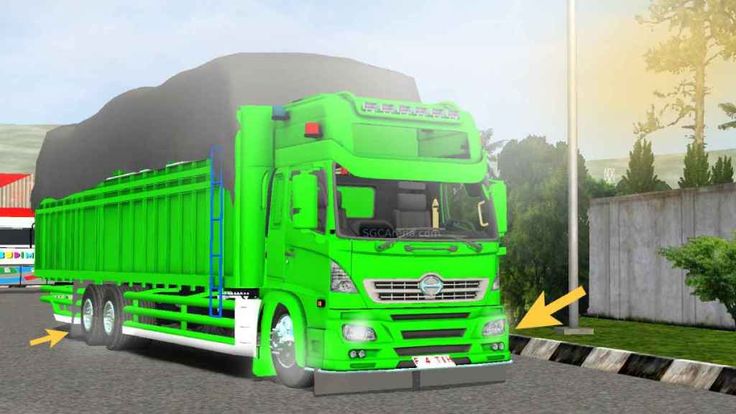
Hino 500 Mod Bussid is a well-known heavy-truck style mod in the BUSSID community. Are you looking for a heavy-duty truck option for Bus Simulator Indonesia? If you are tired of driving weak trucks that struggle to climb the Kelok 44 Map, this is the upgrade you need.
This specific version is the Hino 500 Tronton, created by the legendary modder Bud Design. Unlike standard trucks, the Tronton configuration is presented as a long-chassis heavy-load build with cargo-focused styling.
Why is the Hino 500 Mod Bussid So Popular?
The Hino 500 Mod Bussid combines heavy-truck styling with detailed visual features. In the world of Bussid, “Tronton” refers to a truck with a 10-wheel configuration (two rear axles). This design allows you to carry extreme loads—like concrete pipes, timber, or earth—for heavy-load roleplay; cornering stability still depends on speed, map and game physics.
Bud Design has crafted this mod with 4K textures, with high-resolution textures described by the mod source. Whether you are driving on the smooth toll roads of Java or the muddy off-road tracks of Sumatra, this truck feels heavy and grounded.
Key Features of Hino 500 Tronton
This is not just a visual upgrade; it completely changes how the game feels. Here are the features that make this Hino 500 Mod Bussid a must-download:
- Heavy Load Support (Muatan Berat): Designed specifically for “Gayor” (overloaded) cargo. The source describes a suspension setup intended for heavy-load roleplay; actual behaviour depends on the file and game physics.
- Realistic Suspension: The springs compress and rebound naturally when you hit potholes, giving you that satisfying “heavy truck” bounce.
- Detailed Interior: The source lists dashboard animation, speedometer, RPM and GPS-style elements; confirm the current file version for functional details.
- Custom Livery Support: The mod comes with a template so you can create your own dirty or clean truck skins.
- Animation List:
- Driver Door Opens
- Passenger Door Opens
- Engine Tilt (Head drops forward)
- Side Bak (Bed) Drops Down
Driving Experience: Hino 500 vs. Tata Signa
Many players ask: “Should I drive the Hino 500 or the Tata Signa?”
The answer depends on your map. The Tata Signa Truck Mod is excellent for Indian-style traffic and rough village roads. However, the Hino 500 Mod Bussid is the king of Indonesian highways. Its longer chassis makes it more stable at high speeds (100km/h+), making it the better choice for long-distance deliveries across the Trans-Java Toll Road.
If you want to test your skills, we recommend taking this Hino Tronton to the Kelok 44 Map. The steep inclines and hairpin turns will test your ability to manage momentum and braking with a heavy load.
Real World vs. Bussid: Technical Specifications
For the die-hard truck fans, this mod is based on the real-life Hino Ranger FM 260 JD series, which is the backbone of Indonesian logistics. Bud Design has replicated the specs to match the real truck’s performance.
| Feature | Real Hino FM 260 JD | Bussid Mod Version |
| Engine | J08E-WA Diesel (260 PS) | High Torque Config |
| Axle | 6×4 (Double Rear Axle) | 6×4 Tronton (Active) |
| Transmission | 8-Speed Manual | 6-Speed Manual |
| Top Speed | 100 km/h (Limited) | 160 km/h+ (Unlocked) |
| Suspension | Rigid Leaf Spring | Soft “Oleng” Tuned |
Note: The “Oleng” suspension in the mod is slightly softer than real life to allow for the famous Indonesian “Truck Swaying” style on the road.
How to Install Hino 500 Mod Bussid
Installing this mod is simple. Follow these steps to get driving in under 2 minutes:
- Download the File: Click the download button below to get the
.bussidmodfile. - Locate the File: Go to your file manager and find the file in your “Downloads” folder.
- Move to Mods Folder: Copy the file and paste it into
Internal Storage > BUSSID > Mods. - Launch the Game: Open Bus Simulator Indonesia, go to “Garage,” and use the arrow keys to find your new Hino truck.
Troubleshooting
- Mod Not Showing? Ensure the file ends in
.bussidmod. If it is a.zipfile, you must extract it first. - Lagging? This is a “High Detail” mod. If your phone has less than 3GB RAM, try lowering your “Traffic Density” settings in the game options.
- Credits: Mod by BuDesign
- Size: 56.2 MB